HarePoint Analytics
Practical and effective analytics solution for sites based on SharePoint Online. Get the complete insights and usage analytics to drive your productivity and optimize employee engagement.
HarePoint Analytics Online
Cloud-native analytics for SharePoint Online. Deploy in minutes.
Power BI Dashboards
Visually appealing dashboards with deep Power BI integration.
Drill-Down Reports
Cross-linked reports reveal exact user behavior and patterns.
Performance Metrics
Track search times, page loads, and performance dynamics.
Ready to Use
Easy deployment. Start analyzing immediately.
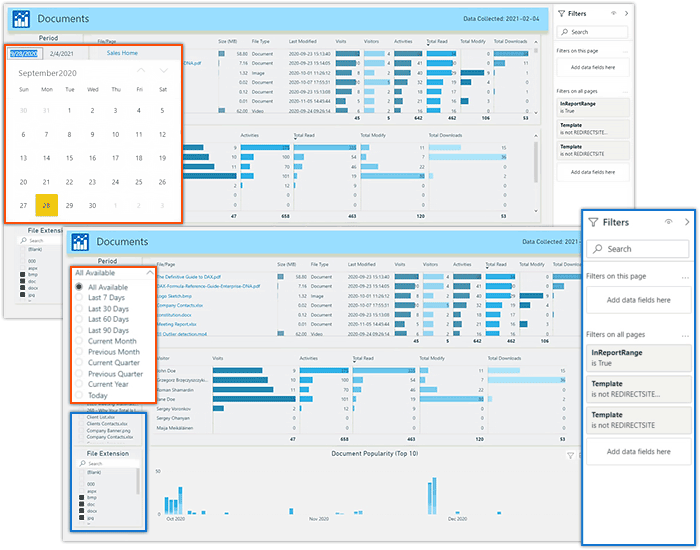
Precise data range selection and filters
Use our data period presets and fine-tune them with the data-range selection slicer and a calendar picker. You can bookmark your selection and set the tuned data as a default template in your Power BI. Using our filter pane together with the powerful filtering capabilities of Power BI you can create a dashboard that suits your needs perfectly.
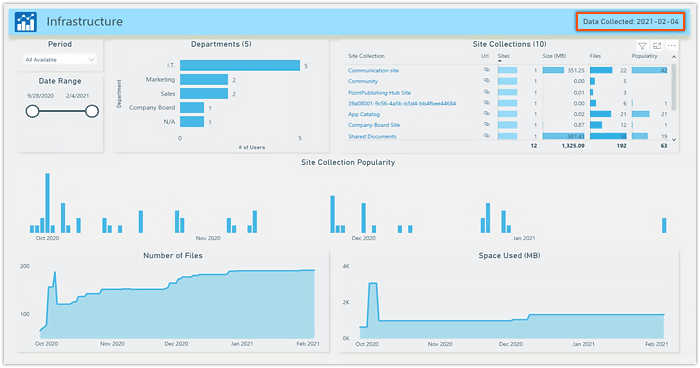
General overview of the company infrastructure
Quick company infrastructure overview for the current date will give general information about the most essential data: Number of site collections, Size of the storage used and its dynamics, popularity trends of your site collections, and other important data.
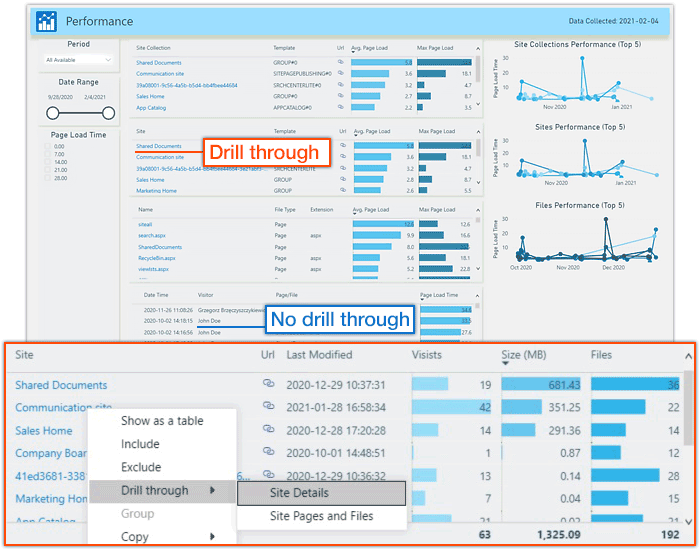
Intuitive Drill-through fields
It is hard sometimes to determine drill-through or cross-report-enabled fields in Power BI. We’ve highlighted those fields so you don’t need to look for little Power BI pictograms to determine the fields with further details. Just right-click the highlighted fields and you will see all the drill-through levels possible.
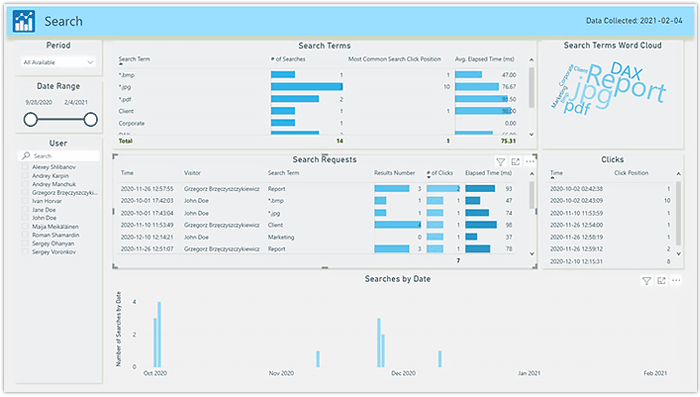
Advanced search analytics
Detailed reports on the search activity of your users will give you a clear understanding of the structure of your site. You will see what users are trying to find on your site and will see how successful their search is. Based on that information you can optimize your website to make the most popular topics easily accessible.
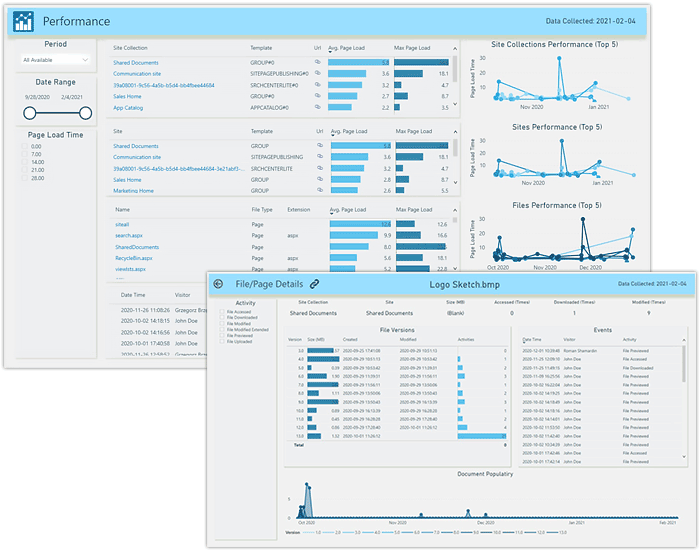
Detailed activity reporting
You can see the site popularity trend as well as visitors’ activity (visit path), devices used, Browser name and version, OS, Geodata, visit durations and much more. Drilling down further will reveal the details about files and documents on the site. You will see full information about the document including the version changes, who and when had modified, downloaded and read the document, etc.
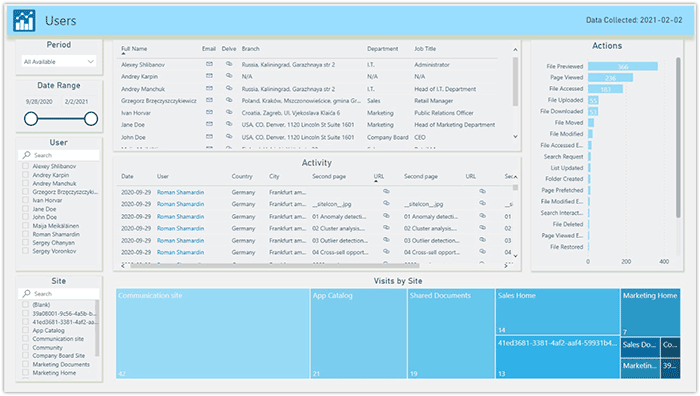
Full User details
See the full information about SharePoint users in your infrastructure including contact information, Job title, Department and Users' actions. You can see the most visited Websites and the most popular actions that your users perform across your site collection. You can also drill-down to more detailed user information by right-clicking the highlighted fields.
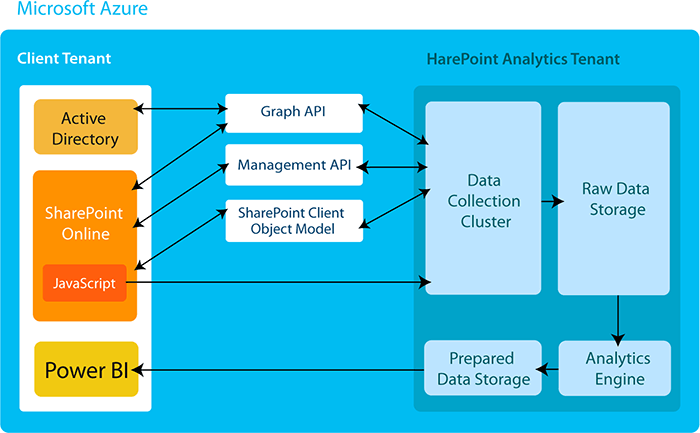
Usage Data Collection and Processing
SharePoint Online usage data is collected with the help of Graph and Management APIs, SharePoint Client Object Model, and a special JavaScript tracking code. Later, this information is processed by the HarePoint Analytics engine to be available in detailed Power BI reports and dashboards.
Build on Our Platform
Extend HarePoint with custom integrations, workflows, and automation using our developer-friendly APIs.
RESTful APIs
Full-featured REST APIs with comprehensive documentation, SDKs for popular languages, and GraphQL support.
Webhooks & Events
Real-time event streaming, webhook integrations, and custom automation workflows for your business logic.
Custom Data Connectors
Connect to external data sources, build custom dashboards, and integrate with your existing tools.
Enterprise Support
Dedicated support, SLA guarantees, custom onboarding, and priority feature requests for platform users.
On-Premises Solutions
For organizations with strict compliance requirements or existing infrastructure investments.
Complete Control Over Your Data
Deploy HarePoint Analytics directly on your infrastructure. Perfect for regulated industries, government agencies, and organizations with air-gapped environments.
- Full data sovereignty and compliance control
- Supports SharePoint 2016, 2019, and Subscription Edition
- Custom deployment and integration support
- Dedicated technical account manager
Legacy Products & Extensions
Supporting organizations still running older SharePoint versions with proven, reliable tools.